Short Video Templates That Sync to Your Music
VidMint's template library turns raw clips into structured short videos in one tap: each template bundles cuts, captions, transitions and motion synced to the music's beat grid. Every template is fully customizable after applying, and the core library is free with watermark-free export.
How to use a template in 3 steps
Using a VidMint template takes three steps: pick a template matched to your format, drop in your clips, then customize text and colors before export. Templates are starting points, not cages — every element stays editable.
Pick your format
Filter templates by use case — podcast clip, product demo, vlog, tutorial, trend — and preview with your own footage in one tap.
Drop in your clips
VidMint maps your footage into the template's slots and syncs every cut and caption beat to the music automatically.
Customize and export
Adjust fonts, colors, caption styles and timing, then export watermark-free or save your version as a private template.
What a VidMint template actually contains
A VidMint template is a complete editing decision set — cut rhythm, caption style, transition language and music pairing — so applying one transfers a proven structure onto your footage instead of starting from an empty timeline.
Beat-synced cuts
Edit points are pinned to the track's beat grid, so applied templates keep their rhythm with your footage.
Caption systems
Each template ships with a tuned caption style — font, animation, position — matched to its pacing.
Format blueprints
Podcast clip, before-and-after, product demo, day-in-the-life: structures proven in each niche.
Brand presets
Save your colors, fonts and caption style as a house template so every video ships on-brand.
The template library in the app
A real browse through the VidMint template shelf: format categories up top, live previews under your thumb, and one tap to map any structure onto your own footage — every element stays editable after applying.
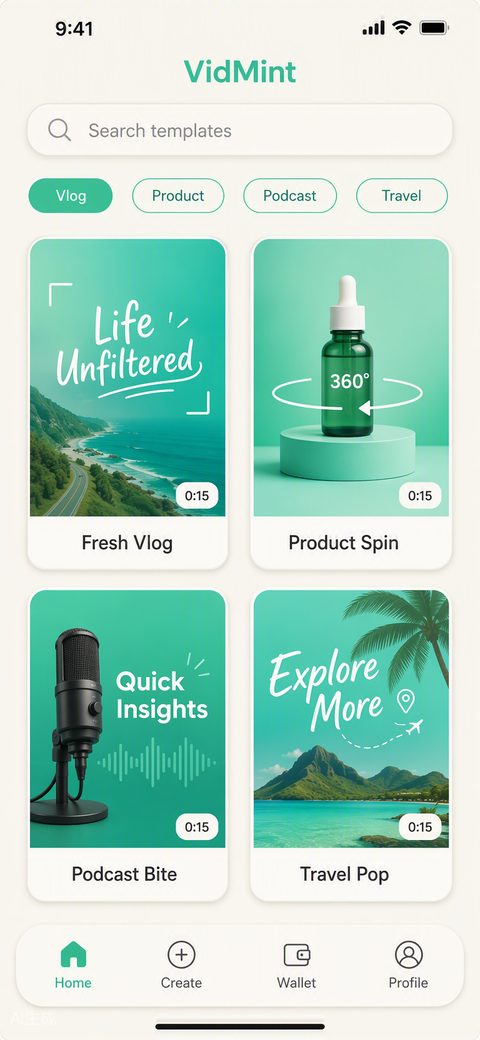
From template to house style
The fastest creators treat templates as a first draft: apply a proven structure for speed, customize the surface for identity, then save the result as a reusable house template that compounds with every video.
Consistency is an algorithmic advantage — recognizable pacing and caption styling train your audience to stop scrolling for your videos specifically. VidMint's brand presets make that consistency automatic across a team or a content series.
The template category hub on this site maps the library by use case; browse the template library overview to find your format before opening the app.
Why beat sync matters more than effects
Viewers feel editing rhythm before they notice any effect: cuts that land on the beat read as professional, while off-beat cuts read as accidental — which is why every VidMint template is built on the music's beat grid first.
When you swap the music track, the template re-syncs automatically, so you are never locked to the demo track. Pair a template with VidMint's music library and the licensing, syncing and ducking are handled in the same step.
Related VidMint tools
This feature is one spoke of the VidMint toolkit — these sibling tools plug into the same one-tap workflow.
AI Video Editor
Templates live inside the one-tap editor.
Open the editor →Background Music
Every template re-syncs to whatever track you choose.
Add music →Template Library
Browse template categories by use case.
See the library →See every capability on the VidMint features hub.
Frequently asked questions
Are VidMint templates free?
Yes. The core template library is free, including beat sync and watermark-free export. VidMint Pro adds premium template packs designed with professional creators.
Can I customize a template after applying it?
Fully. Every element — cuts, captions, fonts, colors, timing, music — stays editable after applying. You can also save your customized version as a private reusable template.
How often are new templates added?
New templates ship with every app update, timed to emerging formats and seasonal trends. Pro subscribers get early access to new packs.
Can I use templates for client or commercial work?
Yes. Videos made with VidMint templates, including the bundled licensed music within its license terms, can be used commercially, including client work and ads.
Do templates work with horizontal footage?
Yes. Templates accept any footage; horizontal clips are reframed to vertical with smart subject tracking before the template structure is applied.
Start from a proven structure
Free beat-synced templates for every short-video format. Customize everything, export clean.
Experience VidMint Free