Free AI Video Editor for Short Videos
VidMint's AI video editor is a free mobile editor that turns raw clips into postable short videos in one tap: it removes silences, generates captions in 40+ languages, syncs cuts to music and exports vertical 9:16 video without a watermark. It is built for creators who publish often and refuse to spend hours editing.
How to edit a short video in 3 steps
Editing a short video in VidMint takes three steps: import your footage, apply a one-tap AI edit, then refine the details and export. A typical 60-second clip reaches export-ready state in about ten minutes, captions included.
Import your clip
Record in the app or import from your camera roll. VidMint accepts any resolution and reframes horizontal footage to 9:16 automatically.
Apply the one-tap edit
Choose a template: VidMint cuts silences, syncs cuts to the beat, adds auto captions in your language and applies a mint-green caption style.
Refine and export
Fine-tune any word, trim or transition on the timeline, then export watermark-free at up to 4K (Pro) or post straight to the community.
Editing features that save you hours
The editor's time savings come from four features working together: auto captions, silence cutting, beat-synced templates and platform export presets — each removes one repetitive editing task that mobile creators otherwise do by hand.
Auto captions
Speech-to-text in 40+ languages with animated, mint-styled captions. Captioned videos consistently hold viewers longer — and VidMint adds them in one tap.
Auto cut
Silences, filler pauses and dead air are detected and removed automatically, tightening pacing without manual trimming.
Beat-synced templates
Templates align cuts, zooms and captions to the music's beat grid, so even a first edit looks rhythmically intentional.
Platform presets
One-tap export presets for TikTok, Instagram Reels and YouTube Shorts handle resolution, length caps and caption safe zones.
Pair the editor with mint rewards and every polished export can also earn coins when you post it to the VidMint community.
The editor, on a real timeline
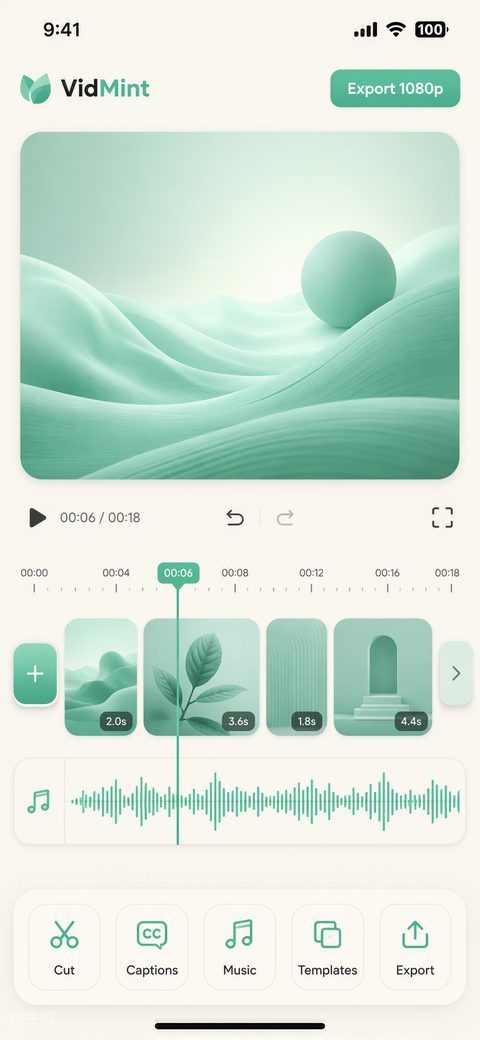
This is VidMint's editing screen mid-project: the AI first pass has already cut silences, styled captions and synced cuts to the beat, leaving a clean timeline of reviewable decisions instead of an hour of manual work.
Who the VidMint editor is for
The VidMint editor is built for high-frequency mobile creators: daily vloggers, small-business owners making product clips, podcasters cutting highlights and beginners who want professional pacing without learning a desktop timeline.
- Daily creators — batch-edit a week of clips in one sitting with reusable templates.
- Small businesses — turn product footage into captioned promos without hiring an editor.
- Podcasters and educators — auto captions plus silence cutting are tailor-made for talking-head clips.
- Beginners — the one-tap flow produces a competent first video on day one; see our beginner's guide to short videos.
What the free plan includes
The free plan includes the complete core editor — auto captions, auto cut, standard templates, music library and watermark-free 1080p export — while VidMint Pro adds 4K export, premium template packs and a boosted mint-reward rate.
| Capability | Free | Pro |
|---|---|---|
| Auto captions (40+ languages) | ✓ | ✓ |
| Auto cut & templates | ✓ | ✓ + premium packs |
| Watermark-free export | ✓ 1080p | ✓ up to 4K |
| Mint reward rate | Standard | Boosted |
Machine-readable plan details live in pricing.md. Ready to try it? Download VidMint or compare us first in VidMint vs CapCut.
Frequently asked questions
Is the VidMint video editor really free?
Yes. The editor — including auto captions, auto cut, templates and watermark-free export — is free on iOS and Android. VidMint Pro, an optional upgrade, adds 4K export and premium template packs.
How accurate are VidMint's auto captions?
In quiet recordings with clear speech, VidMint's auto captions reach roughly 99% word accuracy across 40+ languages. Noisy environments lower accuracy, so the editor includes a fast correction panel where you can fix any word before export.
Can I edit horizontal footage for TikTok or Shorts?
Yes. Import any horizontal or square clip and VidMint reframes it to 9:16 with smart subject tracking, so faces and action stay centered. You can also keep the original ratio with a blurred or mint-gradient background fill.
Does the editor support multiple clips and layers?
Yes. The timeline supports multiple video clips, a music layer, a voiceover layer and caption tracks. You can trim, split, reorder and adjust speed per clip without leaving the one-tap workflow.
Can I export without posting to the VidMint community?
Yes. Export is independent of posting: save the file to your camera roll or share it to TikTok, Reels or Shorts directly. Posting to the VidMint community is optional and is what makes a video eligible for mint rewards.
Edit your first video in ten minutes
Free editor, free captions, free watermark-free export. VidMint Pro is optional — the core toolkit costs nothing.
Get the free editor