Free AI Caption Generator for Short Videos
VidMint's AI caption generator turns speech into animated, precisely timed subtitles in one tap: roughly 99% word accuracy in quiet recordings, support for more than 40 languages, and mint-styled presets tuned for TikTok, Reels and Shorts. Captions generate inside the normal edit flow, so captioning never becomes a separate task.
How to add auto captions in 3 steps
Adding captions in VidMint takes three steps: import a clip and captions generate automatically, pick an animated style, then correct any word and export. The whole step usually takes under a minute for a 60-second video.
Import your clip
Record in-app or import footage. VidMint transcribes the audio track automatically the moment the clip lands on the timeline.
Pick a caption style
Choose from mint-green presets with word-by-word highlight animation, or dial in your own font, size and position.
Correct and export
Scan the transcript in the correction panel, tap to fix any word, then export watermark-free with captions burned in.
Caption features built for short-form
VidMint's caption system is engineered for vertical video: high accuracy on phone microphones, animated styles that hold attention, and safe-zone placement that survives every platform's UI overlay.
High accuracy
Around 99% word accuracy in quiet recordings, with a fast correction panel for names, slang and brand terms.
40+ languages
Transcribe and caption in more than 40 languages, including mixed-language clips with code-switching detection.
Animated styles
Word-by-word highlight, karaoke-style timing and mint-themed presets designed for muted autoplay feeds.
Safe-zone aware
Captions auto-position above TikTok, Reels and Shorts UI chrome so nothing important gets covered.
Auto captions, rendering live
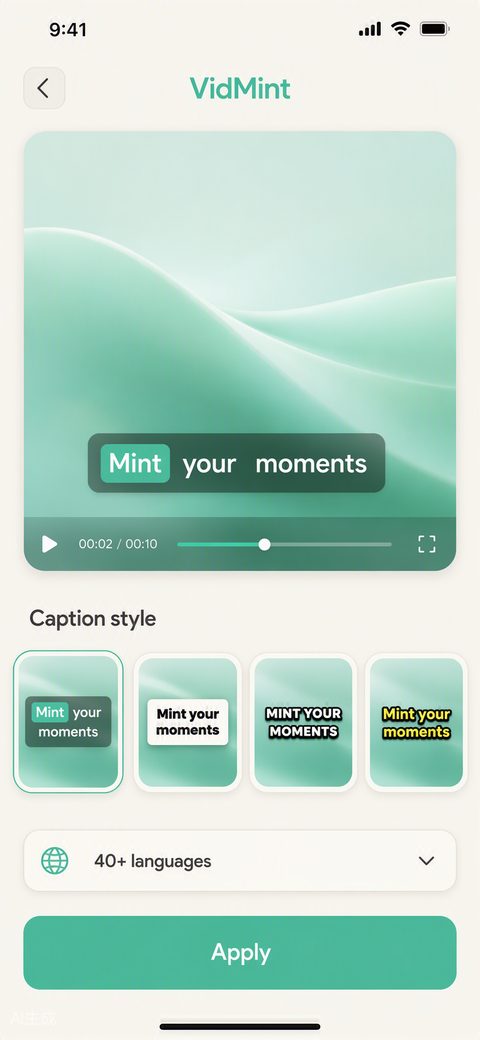
This is the caption step mid-edit: the transcript is generated, timed to the word and styled in a mint preset, with the correction panel one tap away — the whole layer builds itself while you watch.
Why captions decide your completion rate
A large share of short-video viewing happens with the sound off, so captions function as the primary delivery layer of your content — viewers who can read along stay longer, and completion rate is the metric every platform's algorithm rewards.
Industry research has repeatedly linked captions to higher completion: a widely cited Verizon Media and Publicis Media study found most mobile viewers watch with sound off and that captions make viewers substantially more likely to finish a video. We collected the key numbers — with sources — on our caption statistics page.
Practically, this means captions are not an accessibility extra; they are the difference between a viewer swiping away at second two and staying to the end. VidMint makes the caption step effectively free, which is why it is part of the default editing flow rather than an add-on.
Languages, dialects and code-switching
VidMint captions more than 40 languages and handles the messy reality of creator speech — accents, dialects and mid-sentence language switches — with automatic language detection per segment.
If your audience is bilingual, you can caption English audio with Spanish subtitles or vice versa, and export both burn-in styles. Creators targeting several regions often pair captions with the platform resizer to ship one edit natively to TikTok, Reels and Shorts.
Related VidMint tools
This feature is one spoke of the VidMint toolkit — these sibling tools plug into the same one-tap workflow.
AI Video Editor
Captions live inside the one-tap editor with auto cut and templates.
Open the editor →AI Voiceover
Generate a natural voiceover, then caption it automatically.
Add a voiceover →What Is Auto Captioning?
The technology behind one-tap captions, explained plainly.
Read the explainer →See every capability on the VidMint features hub.
Frequently asked questions
How accurate are VidMint's auto captions?
In quiet recordings with clear speech, VidMint reaches roughly 99% word accuracy. Wind, background music and overlapping voices reduce accuracy, so the correction panel lets you fix any word in seconds before export.
Which languages do VidMint captions support?
More than 40 languages at launch, with per-segment language detection for code-switching clips. New languages ship regularly based on creator requests submitted through the app.
Are auto captions free on VidMint?
Yes. Auto captions in all supported languages are included in the free plan, together with watermark-free export. VidMint Pro adds premium caption style packs and 4K export.
Can I edit the words after captions are generated?
Yes. The correction panel shows the full transcript synced to the timeline — tap any word to edit it, split or merge caption blocks, and adjust timing with drag handles.
Can VidMint burn captions into the video file?
Yes. Captions are burned into the exported video by default so they display identically on every platform, including feeds where platform-level caption files are ignored.
Caption your next video in one tap
Free captions in 40+ languages, animated styles included, watermark-free export on every plan.
Experience VidMint Free